Talking Caller ID & SMS1.2
Publisher Description
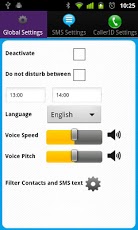
TalkingPlus is a Talking SMS & Talking CallerID App.
Very useful when driving your car.
One convenient App for reading your SMS and also reading you Called Id's.
This App is loaded with features.
PHONES KNOWN NOT TO WORK
- LGE Optimus ( some versions)
- HTC Mecha (Incredible HD)
- Huawei M860
- Phone will read the Sender Name & Full message for you.
- Reads in coming callers callerID
- Option to enable or disable
- Option to set "do not disturb" time period
- Option to allow reading SMS immediately or on user click
- Select language of your choice to read your SMS
- Option to reply to SMS
- Speech testing option
- Filter Option, Filter by Phone number or SMS Text content
- Shake to stop reading.
- Honors vibrator mode
***[ IMPORTANT INFORMATION ]****
- You must have installed the English "Pico TTS" and the "Pico TTS" for the language configured on your mobile.
To check this go to Android Settings -> Voice Input & Output -> Text-to-Speech settings > Pico TTS (Pico TTS settings) and then click on "Install voice data" and install at least the English "Pico TTS", and the "Pico TTS" for the language configured on your mobile
Keywords:Talking Caller ID and SMS Reader
About Talking Caller ID & SMS
The company that develops Talking Caller ID & SMS is BlueHermit. The latest version released by its developer is 1.2. This app was rated by 1 users of our site and has an average rating of 4.0.
To install Talking Caller ID & SMS on your Android device, just click the green Continue To App button above to start the installation process. The app is listed on our website since 2012-12-30 and was downloaded 28 times. We have already checked if the download link is safe, however for your own protection we recommend that you scan the downloaded app with your antivirus. Your antivirus may detect the Talking Caller ID & SMS as malware as malware if the download link to com.bluehermit.android.talkingplus is broken.
How to install Talking Caller ID & SMS on your Android device:
- Click on the Continue To App button on our website. This will redirect you to Google Play.
- Once the Talking Caller ID & SMS is shown in the Google Play listing of your Android device, you can start its download and installation. Tap on the Install button located below the search bar and to the right of the app icon.
- A pop-up window with the permissions required by Talking Caller ID & SMS will be shown. Click on Accept to continue the process.
- Talking Caller ID & SMS will be downloaded onto your device, displaying a progress. Once the download completes, the installation will start and you'll get a notification after the installation is finished.
Program Details
System requirements
Download information
Pricing
Version History
version 1.2
posted on 2012-12-30
- Shake to stop reading.
version 1.2
posted on 2012-12-30
Several fixes and updates
